Home and Learn: Microsoft Excel Course
Working with Currencies in Excel
Take a look at the following spreadsheet, which you'll shortly be creating:

The C column has a heading of "Price Each". The prices all have the currency symbol. To insert the currency symbol, do this:
- Enter some prices on a spreadsheet (any will do), and highlight the cells
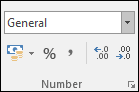
- With the cells highlighted, locate the Number panel on the Excel Ribbon bar (on the Home Tab):
Click the drop down list that says General. You'll then be presented with a list of options:
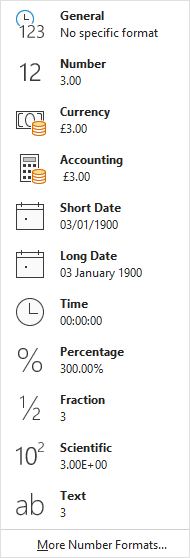
To see other currencies, click on More More Number Formats.The Format Cells dialogue box appears. In the Category list, click on Currency. Select a Currency sign from the Symbol list. The dialogue box will then look like this:

Click OK to set the pound sign as the currency.
In the next part, you'll see how to Merge Cells in Excel, so that they don't spill over into other cells.
<--Back to the Excel Contents Page